/ At a glance
Part 01Sections 01–03
The idea
Why a daily paper, and how a page of text turned into a small research tool.
01Why I built it
Hundreds of new AI papers come out every day. Most people never read past the titles, and for a long time I was one of them.
Every morning arXiv, the site where researchers post their papers before journals do, adds somewhere between a few hundred and well over a thousand new machine learning papers. A handful matter for people who build things. The rest are small variations, surveys, or ideas that will never leave the lab. Telling them apart takes time most engineers don't have.
The lists I tried had one of two problems. Some showed everything, which is the same as showing nothing. Others showed whatever had the most hype that day, which rewards loud titles over useful work. I wanted something smaller and calmer: one paper a day, picked for people who build things, with notes that say what is new, what it found, and what I could actually do with it.
I couldn't find that, so I built it. The goal was never to replace reading papers. It was to make the first five minutes, deciding which paper is worth an hour, take one minute instead.
Before
~45 min
With AI Papers Daily
~2 min
02Where it started
The first version wasn't even a website. It was a page of text on GitHub that rewrote itself every morning with two papers and one line about each. A scheduled job fetched new papers, gave them points from a list of keywords, and asked an AI model for a short summary of the top two.
It worked, but not well, and it took me a while to notice how badly:
- The summaries were broken. For days the AI step had been failing quietly. Nothing crashed, so nothing looked wrong, but every "summary" was just the first sentence copied from the paper.
- The ranking rewarded buzzwords. Papers got points for saying "novel" or "state of the art", and nearly every paper says those. The points measured how a paper was written, not whether it was good.
- Nobody could find it. You had to remember to open a GitHub page every day. Nobody does that, including me.
So I set three goals, in this order. First, make the picks good, and be able to prove it. Second, bring them to where people already are: a website, an email, a feed. Third, give readers something the plain lists don't, like asking the paper a question or finding papers for a project.
Each version below kept the one before it working. The daily edition has gone out every morning through all of them.
v0A README digestTwo papers a day written into Markdown in the repo, scored by keyword rules.v1A websiteA static site on GitHub Pages, with a page for every paper and an RSS feed.v2A libraryA year of papers in Supabase, searchable by meaning, with For you.v3AgentsAsk this paper, Project Scout, the Curator and an LLM judge for the pick.v4MeasuredA picker backtest, eval sets, reader numbers and a weekly code review agent.
03What it does
The daily pick is still the heart of it. Every morning the home page shows two papers: today's pick, the best new paper by the site's own score and judge, and trending, the paper other researchers are upvoting most from a different topic. Around those two, the site grew into a small research tool:
- A page for every paper. Notes at three depths (new to this, practitioner, researcher), the abstract coloured to skim, the paper's own results and limits, a one-question quiz, and links to its code, models and demos.
- Ask this paper. Ask a question and get an answer from the full paper, with the section and the exact sentence it came from.
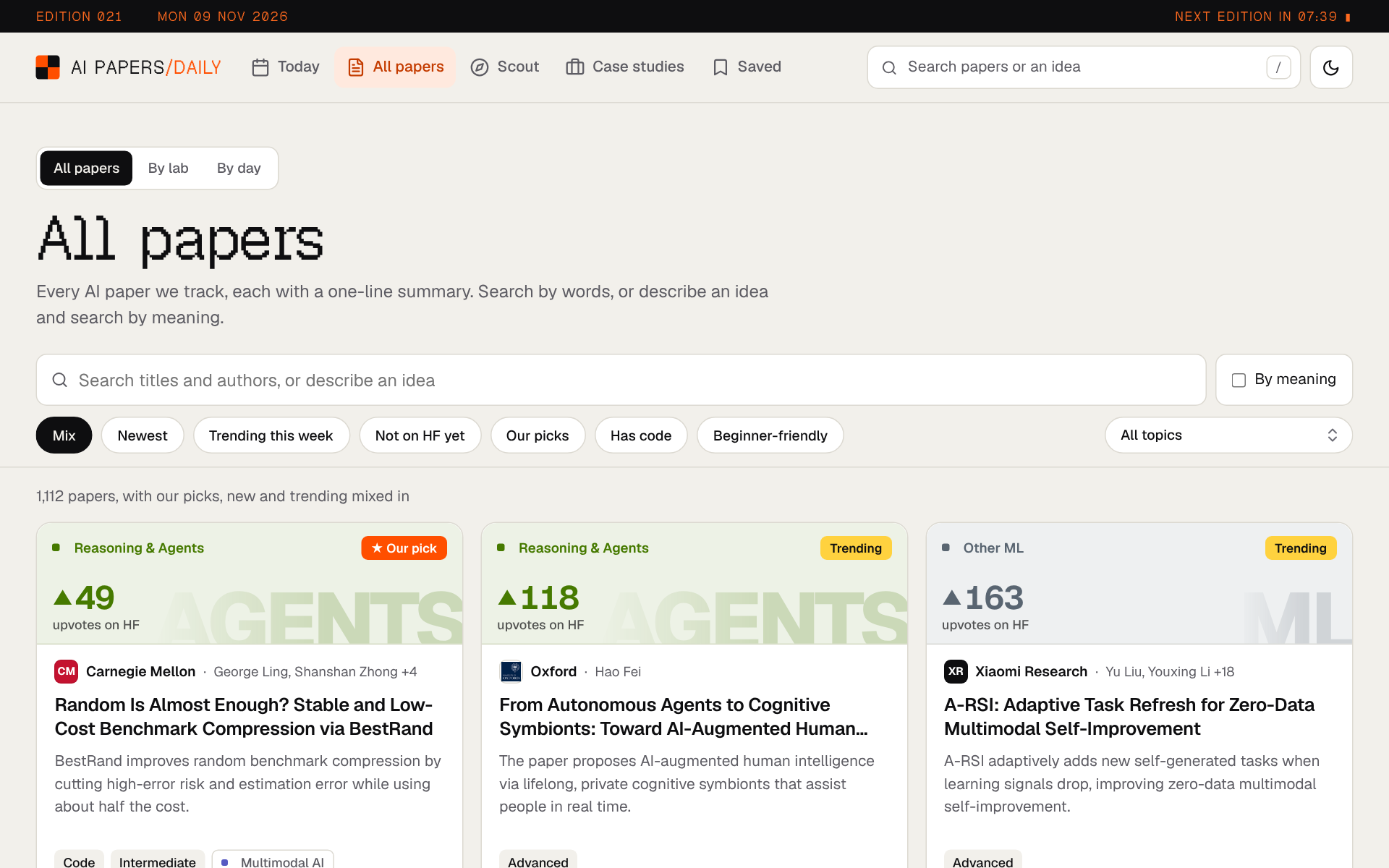
- Search by meaning. Over 8,000 papers from the last year. Type an idea, not exact words.
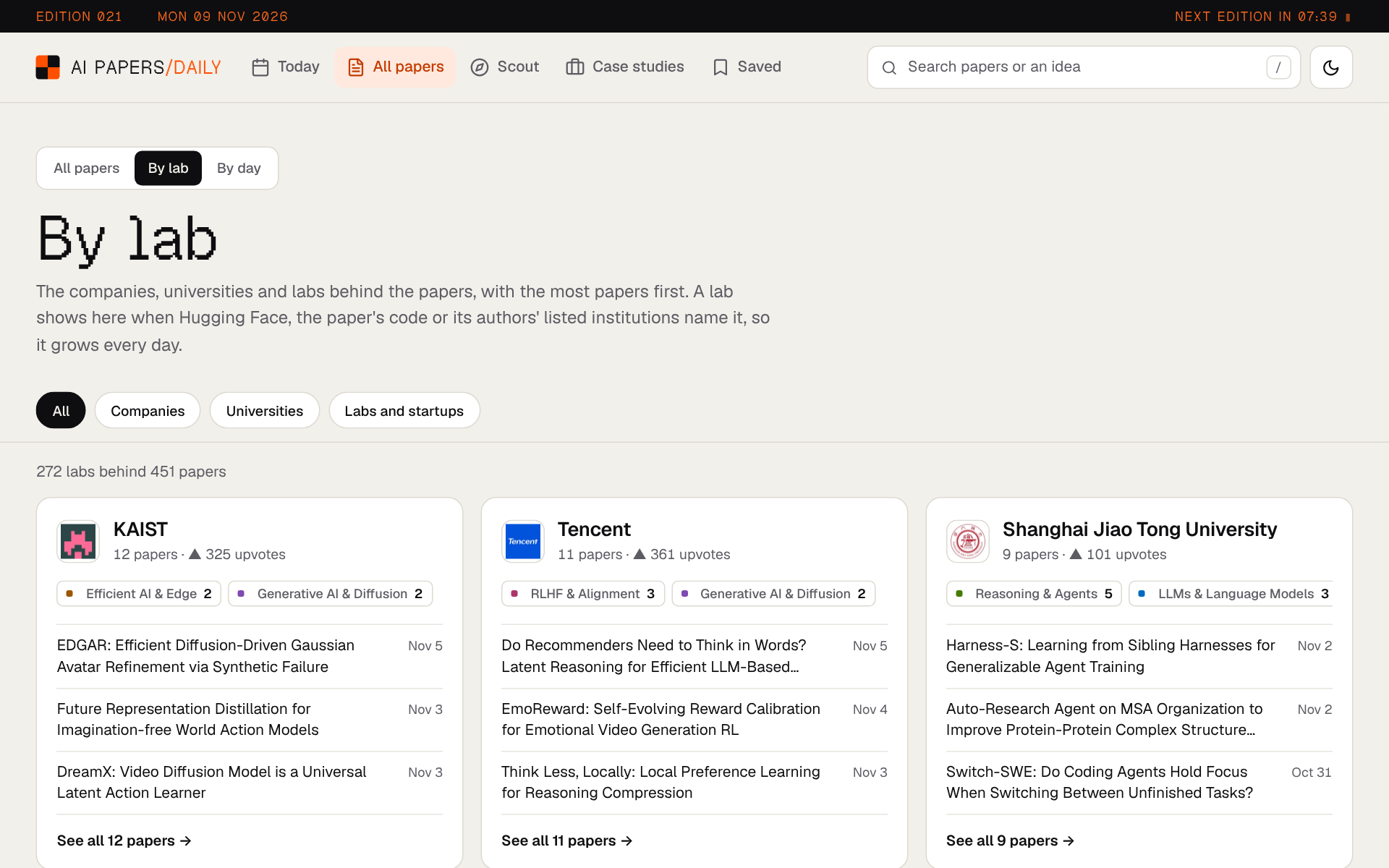
- Papers by lab. See which company or university wrote each paper, with its own logo.
- Project Scout. Describe what you want to build and get a reading list for it, best first, with why each paper fits.
- Trends and Case studies. A year of research as charts, and how real companies build with AI, from their own engineering blogs.
- For you and Saved. Suggestions based on what you read, and your saved papers, highlights and notes, kept in your own browser.
- Email and RSS. The two picks every morning, and a longer weekly edition on Sundays.
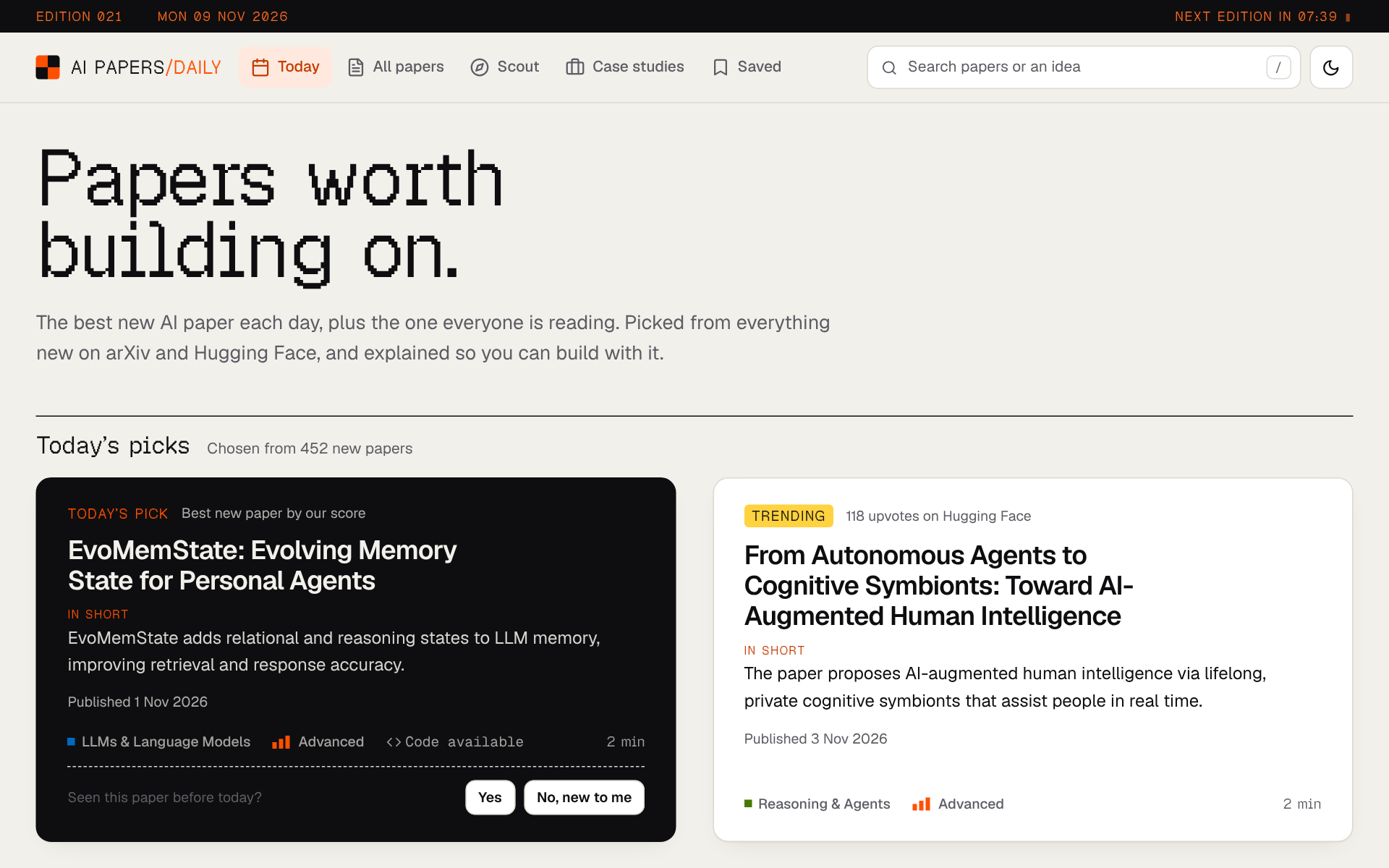
Everything on the site is free and needs no account. Anything personal, like your saved papers or your highlights, stays in your browser.
Part 02Sections 04–07
The morning edition
Everything that happens between 07:00 and the email landing in your inbox.
04One morning, step by step
Everything starts at 07:00 India time (01:30 UTC), when a scheduled job wakes up on GitHub. The whole edition, from the first download to the email, usually takes a few minutes. Watch the whole morning first, then each step is explained below.
- Fetch. It downloads every new paper in seven arXiv categories (AI, machine learning, language, vision, neural computing, robotics and statistical ML) in pages of 500, plus Hugging Face's daily list. On a busy day that is over 1,000 papers. Papers picked in the last seven editions are skipped, so the same paper never wins twice.
- Sort. Each paper is put into up to 3 of 13 topics, like "LLMs and language models" or "Computer vision", based on the words in its title and summary. A paper needs real matches for a topic, not a single passing word.
- Score. Every paper gets points for evidence that it is good. The best 200 are saved, and the top 6 go on to the judge.
- Judge. An AI compares those 6 two at a time and the paper with the most wins becomes the pick. More on this in the next section.
- Pick. The winner becomes today's pick. The most upvoted remaining paper, with at least 5 upvotes and from a different topic whenever one qualifies, becomes trending.
- Write and publish. The AI writes notes for both picks, the links and lab data are gathered, the website is rebuilt and published, and the email goes out.
The steps run as one small graph, built with a library called LangGraph. Each step reads from and writes to one shared state, so a run can be traced step by step, and the graph stops early and cleanly if nothing was fetched or nothing could be picked, instead of publishing an empty edition.
05How one paper gets picked
This is the part I rewrote the most. The first version gave points for words like "novel" and "state of the art". Since nearly every paper says those, the points meant nothing, and the picks were really chosen by chance.
Now a paper only gets points for evidence that it's good, things other people did or that can be checked:
| Signal | Why it counts | Points |
|---|---|---|
| Upvotes on Hugging Face | Other researchers found it worth reading | 8 for each doubling, up to 64 (about 255 upvotes) |
| On Hugging Face's daily list | A person picked it by hand | 8 |
| Released code | You can actually try it | 8, the same as doubling the upvotes |
| A named lab | We know who wrote it, from real evidence | 6 for a well-known lab, 3 for any other |
| Spans two topics | Ideas that cross fields are often useful | 2 |
Upvotes are counted on a log scale on purpose. Going from 2 to 4 upvotes is as meaningful as going from 100 to 200, so one viral paper can't drown out everything else. Surveys and reviews keep a badge but are not the point of a daily pick, which is meant to be new work.
The score finds the strongest few papers, but it can't read. So the top 6 go to a judge. If you ask an AI to "score this paper out of 100", you get a different number every time. If you ask "which of these two should a builder read first?", it answers far more consistently. So the judge does exactly that, for every pair.
- 15 matches. 6 papers make 15 pairs. Each match weighs four things, in order: is it genuinely new, are the results strong and clearly stated, can you reproduce it, and how directly could an engineer use it.
- Only the facts on the page. The judge sees each paper's title, the first 1,200 characters of its abstract, and whether code is released. It is told to ignore hype words, author fame and abstract length, and to treat the abstracts as data, never as instructions.
- Fair sides. Which paper is shown first is shuffled, so the AI can't favour whichever comes first.
- A safe fallback. If more than a quarter of the matches fail, for example because the AI service is down, the scores decide instead. The edition never waits for the judge.
Each match also returns a one-sentence reason, at most 30 words. Those reasons are saved with the day, so when a pick looks odd I can read exactly why it won.
How do I know the picks are good? I built a backtest: it replays every saved day and checks whether the pick turned out to be one of that day's most upvoted papers a few days later, once the community had time to vote.
| Way of picking | Pick was in the day's top 10 | Share of the best paper's upvotes |
|---|---|---|
| Random | 9% | – |
| Old points system | 4 of 4 | 0.88 |
| New points system | 4 of 4 | 0.85 |
| Picking a day later | 3 of 3 | 0.94 |
Only a few days had settled upvotes when I ran this, so the numbers are rough and are re-run as days are added. Picking a day later, once upvotes have built up, looks best so far, so it is a one-line setting.
06How the notes are written
Each pick gets notes: a one-line summary at three depths, what's new, the key result, why it matters, how hard it is to use, ideas for what to build, a quiz question, and short definitions of the hardest terms. An AI writes them, and nothing is published until it passes a check.
- Draft. The AI writes all the notes in one go, as structured data rather than free text.
- Check. Plain code checks every field: is it too long, is anything required missing, and does it mention a number that isn't in the paper?
- Repair. Only the fields that failed go back to the AI, each with the reason it failed. At most two rounds. If more than three required fields fail at once, the draft is thrown away and a different model starts again.
- Fact-check. A second, smaller model checks each claim against the paper's abstract. A claim it can't find support for goes back for repair.
Every field has a word limit, because a limit is the easiest way to keep notes readable and the easiest thing for code to check:
| Field | What it says | Longest allowed |
|---|---|---|
| One-line summary | The paper in one sentence, at three depths | 30 words (35 simple, 40 expert) |
| What's new | What this paper does that earlier work didn't | 45 words |
| Key result | The main finding, with its number | 40 words |
| Why it matters | Who should care, and why | 40 words |
| Difficulty | Beginner, intermediate or advanced, with a reason | 25 words for the reason |
| Build ideas | Things you could make with it | 25 words each |
| Quiz | One question and its answer | 30 and 40 words |
Two more rules matter more than any prompt. Links to code never come from the AI, because it could invent one that looks right. They come from Hugging Face or from the abstract itself. And if the notes still fail after every retry, the paper gets a simple one-line summary instead, so the morning edition always goes out.
07Who wrote the paper
Showing the lab behind each paper sounds easy, but it is easy to get wrong. Papers mention other labs all the time ("we compare with OpenAI's GPT-4o", "built on Meta's Llama"), and that says nothing about who wrote them. Guessing from the abstract would name the wrong lab on a lot of pages.
So a lab is only shown when there is direct evidence, checked in this order:
- The lab claimed the paper on Hugging Face
- The paper's code lives in the lab's GitHub account
- The paper says so in its arXiv comment ("Work done at Meta")
- The authors' listed universities or companies, from OpenAlex
Each lab's logo is found once and saved with the project, so pages never load images from other sites. The big AI companies come from a free icon set; everyone else from Hugging Face, Wikidata, GitHub or the lab's own website. Two names that point to the same Wikidata entry, like "ucas" and "University of Chinese Academy of Sciences", are shown as one lab.
The rule I kept coming back to: it is better to show no lab than the wrong one.
Part 03Sections 08–11
Reading and asking
The parts you use after the email: the paper page, search, questions and project plans.
08The paper page
Every paper the site has seen gets its own page, built each morning. It is designed to be read top to bottom in about two minutes, with the details one scroll away for anyone who wants them.
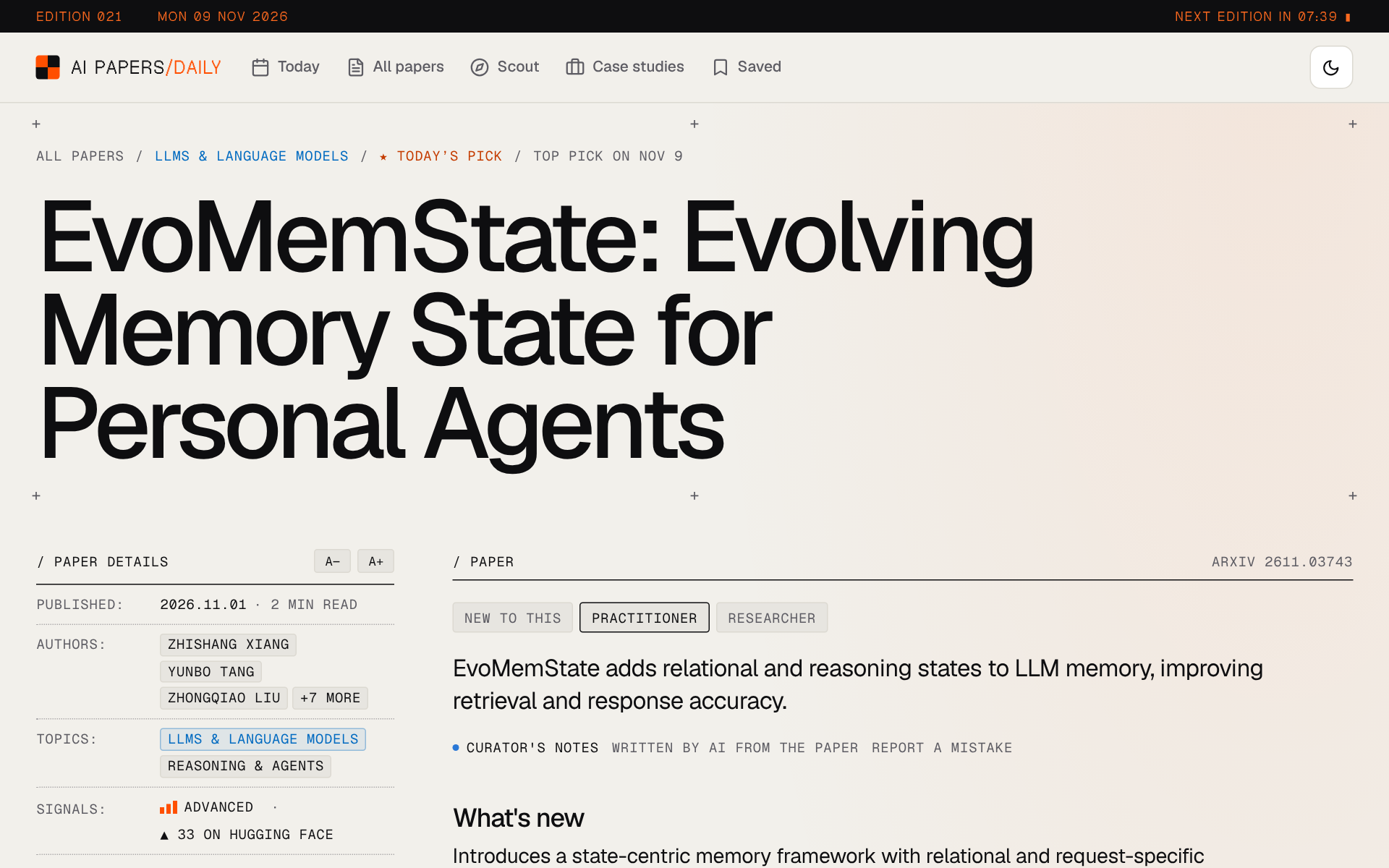
- The details stay beside you. The lab, dates, authors, topics, upvotes and links sit in a column on the left that stays in view as you read, so you never scroll back up to find the PDF.
- Notes at three depths. Switch between new to this, practitioner and researcher. The facts stay the same; only the words change.
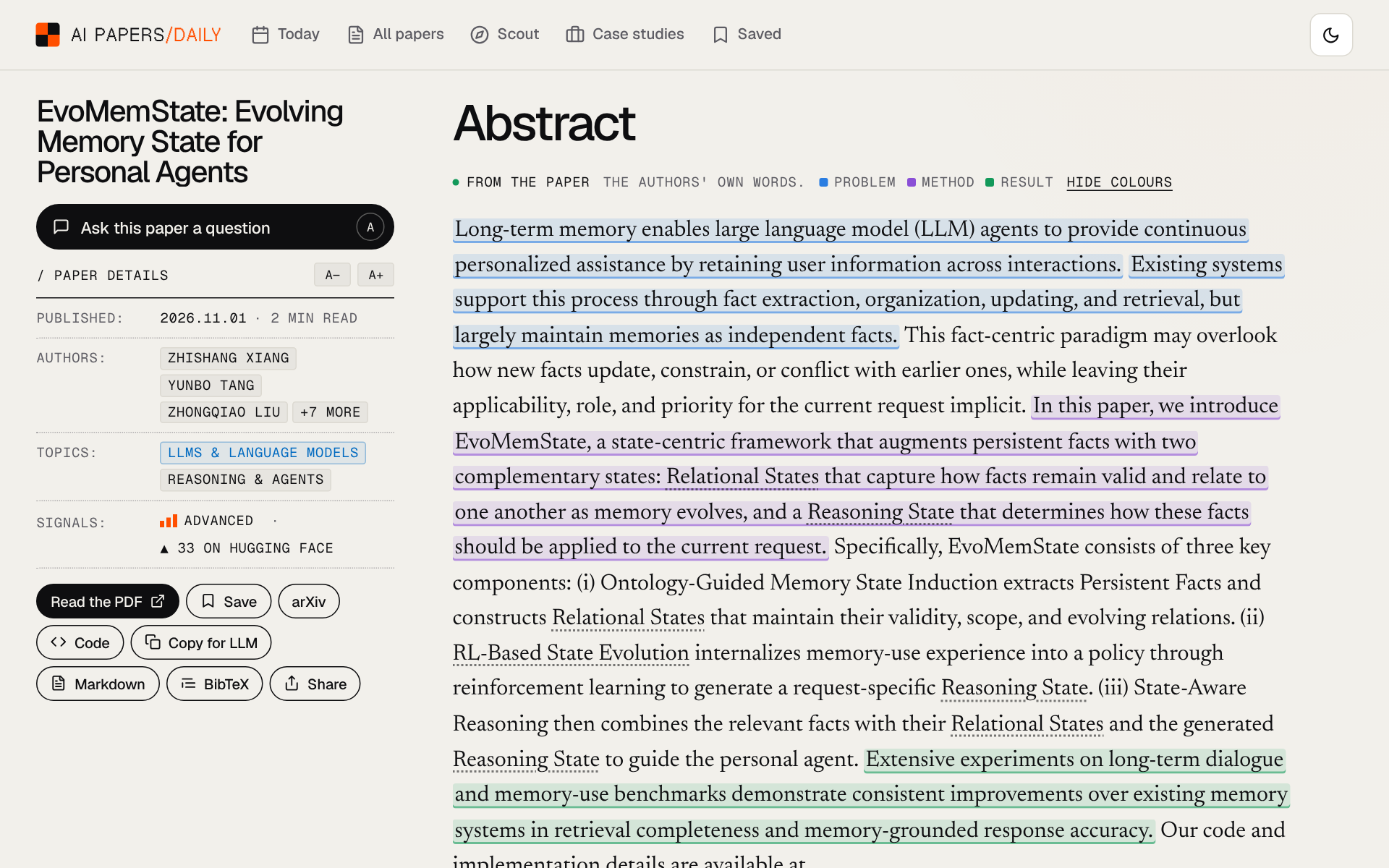
- The abstract, coloured to skim. Press Colour to skim and the sentences about the problem, the method and the result each get their own colour, so the shape of the paper is visible at a glance.
- From the full paper. The contributions, results tables, limitations and conclusion, copied from the paper itself by code, with no AI in between.
- Where it fits. The most cited papers it builds on and the papers that build on it, from Semantic Scholar, plus the code, models and demos that use it.
- Copy for LLM. One click copies the notes, numbers and links as clean Markdown, ready to paste into any chat assistant.
09The library and search
Search needs more than one morning of papers. So a one-time job loaded a year of Hugging Face's daily lists into a database called Supabase, and each morning adds the new day. That is how the library passed 8,000 papers.
To search by meaning, each paper is turned into a list of numbers that captures what it's about, using a small open model called gte-small. Papers about similar ideas get similar numbers, even when they use different words.
The same numbers power For you: the site remembers which papers you opened, in your browser only, and asks the database for papers close to those. Everything else lives in five tables:
| Table | What it holds |
|---|---|
papers | Every paper, its numbers for search, topics and links |
paper_fulltext | Full papers read for Ask, deleted after 30 days if nobody asks |
paper_sections | Those papers split into sections |
paper_stats | Anonymous view counts and “worth it” votes |
rate_limits | How often each visitor can use each feature per hour |
10Ask this paper
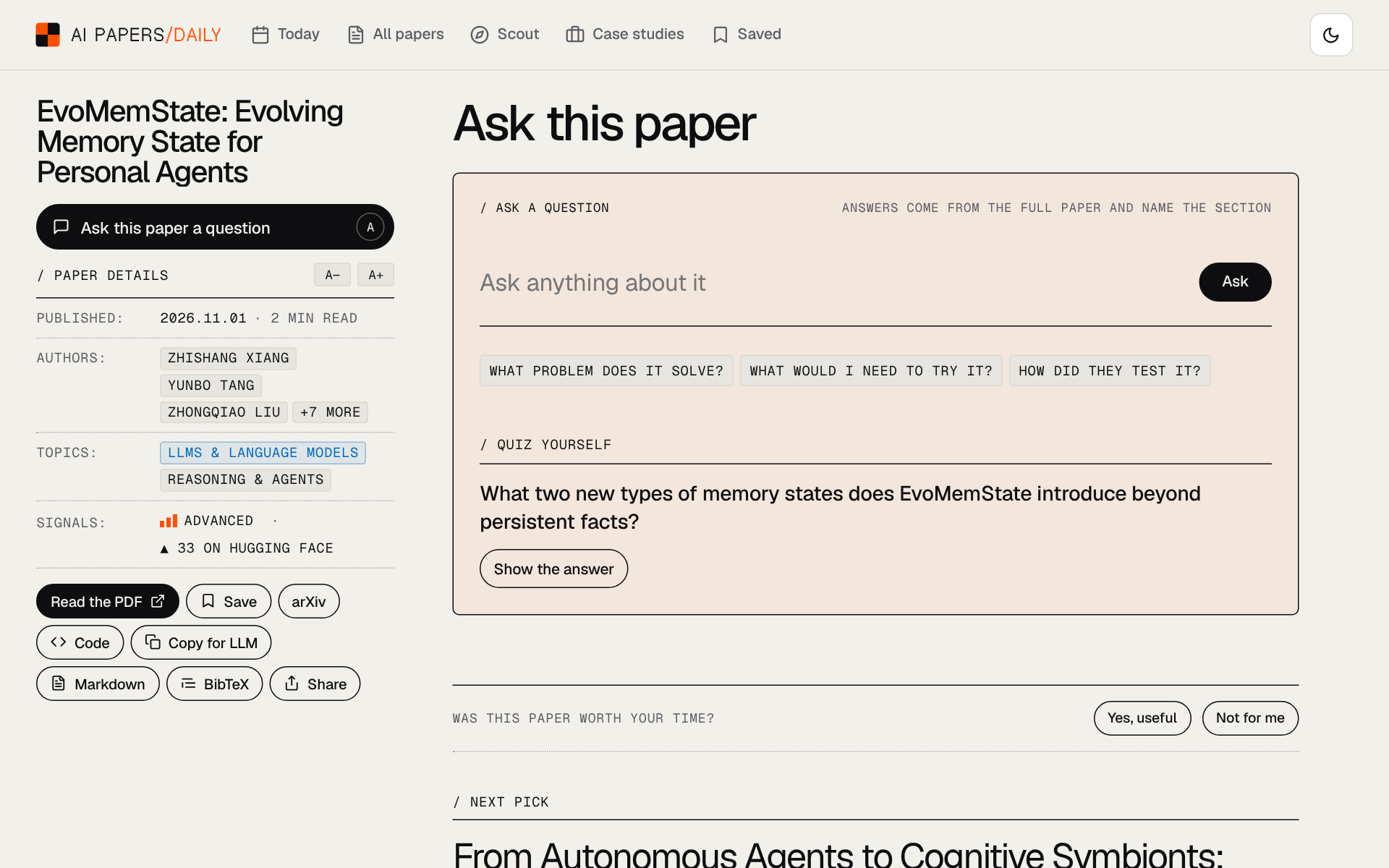
You can ask any paper a question, in your own words. The first question on a paper is the slow one, because the full paper has to be read first. After that, answers take a second or two.
- Read once. The full paper is fetched from arXiv's HTML version, split into sections and saved. Today's picks are read in advance, so they are fast from the first question.
- Find. Your question is turned into numbers and matched against the sections, and the 3 closest ones are kept.
- Answer. The AI answers from those sections only, and returns the section name and the sentence it relied on, so you can check it in one glance.
- Admit it. If the sections don't contain the answer, it says so rather than guessing.
You can also select any sentence on the page and press Ask to ask about just that sentence.
11Project Scout
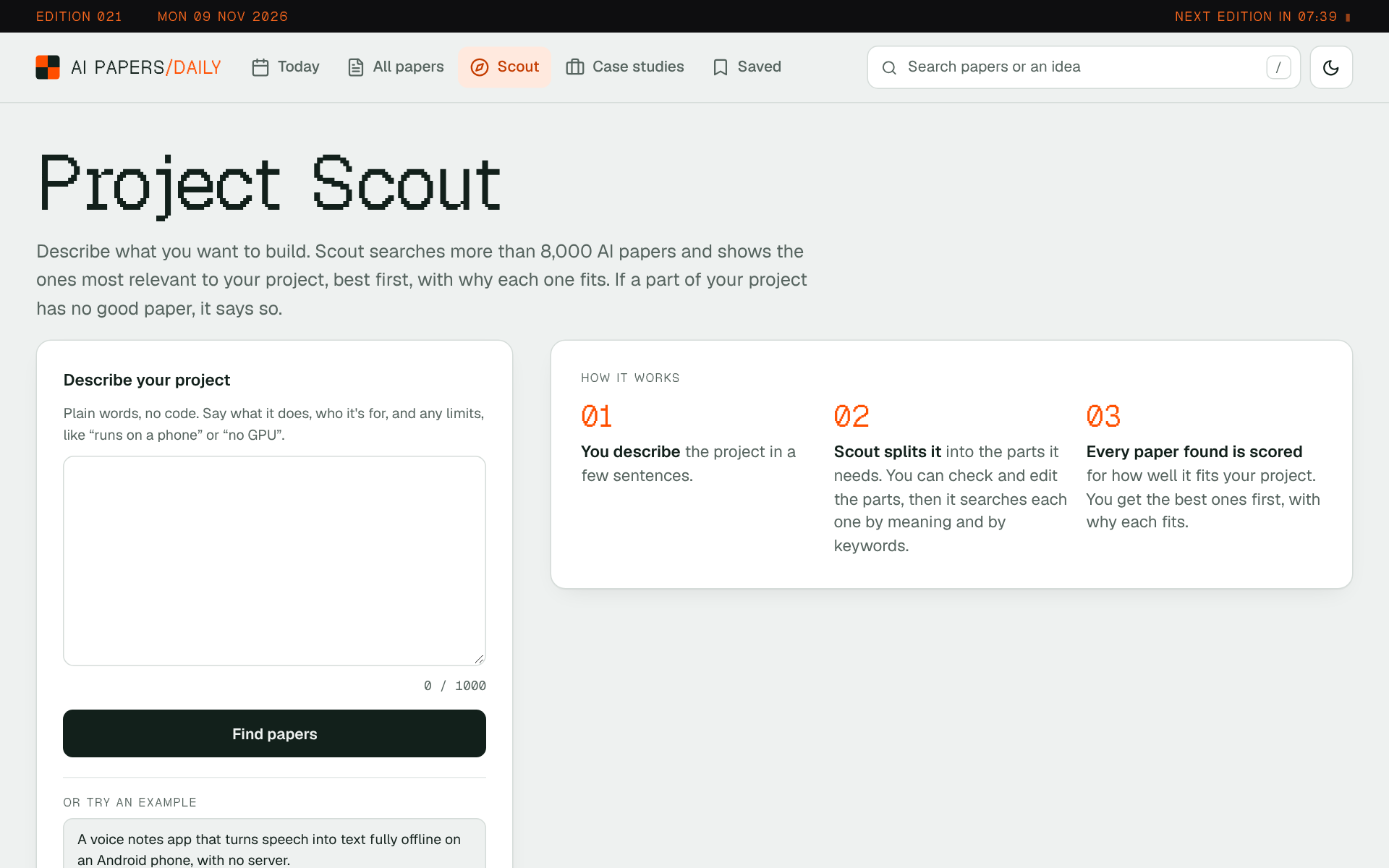
Scout is for when you know what you want to build but not what to read. You describe the project in plain words, like "a voice notes app that turns speech into text fully offline on an Android phone", and it returns the papers to build on.
- Split. The AI breaks your project into the parts it needs, like "speech recognition", "small models" and "running on a phone". You can edit them before it searches.
- Search. Each part is searched by meaning and by keywords, and the two result lists are merged, so neither misses what the other finds.
- Score. The AI rates how well each paper fits your project and says why in one line.
- Search again. If a part has no strong paper, it tries once more with better words, scores only the new papers, and tells you it did.
- Plan. You get the papers best first, grouped into what to read first, what to build on and what to read later.
Scout runs as a small graph inside a Supabase function, with a 2-second budget of computer time per run. The steps make no network calls of their own, so each one is tested with fakes, and the same steps can run without the graph library as a fallback. If the AI is unavailable, Scout still shows its search results, clearly marked as not checked.
Part 04Sections 12–15
Around the papers
The pages and emails that put the daily papers in context.
12Trends
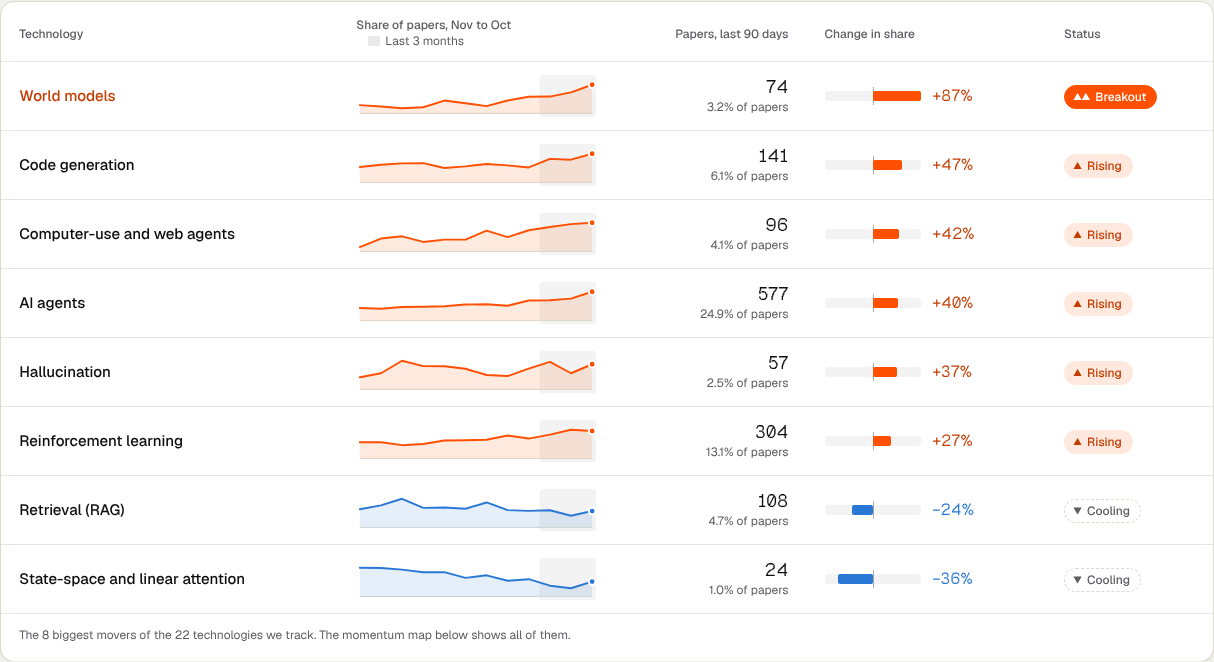
The Trends page opens with a headline written from the numbers, then tells the year in five charts: the topic that grew most, the momentum of every tracked technology, research against what companies build, technologies off their peak, and words on the rise. Below them sit each topic's share month by month and the year in papers. The charts are drawn by the build script itself, as plain images, so the site needs no chart library. Two rules keep them honest:
- One steady source. The trend lines use Hugging Face's daily lists for the whole year. Mixing in my own newer data would make recent weeks look bigger than they are.
- Shares, not counts. A topic is "growing" only if its share of all papers grew, comparing the last 90 days with the 90 before. Very small topics get no growth number at all, because a jump from 2 papers to 4 is not a trend.
13Case studies
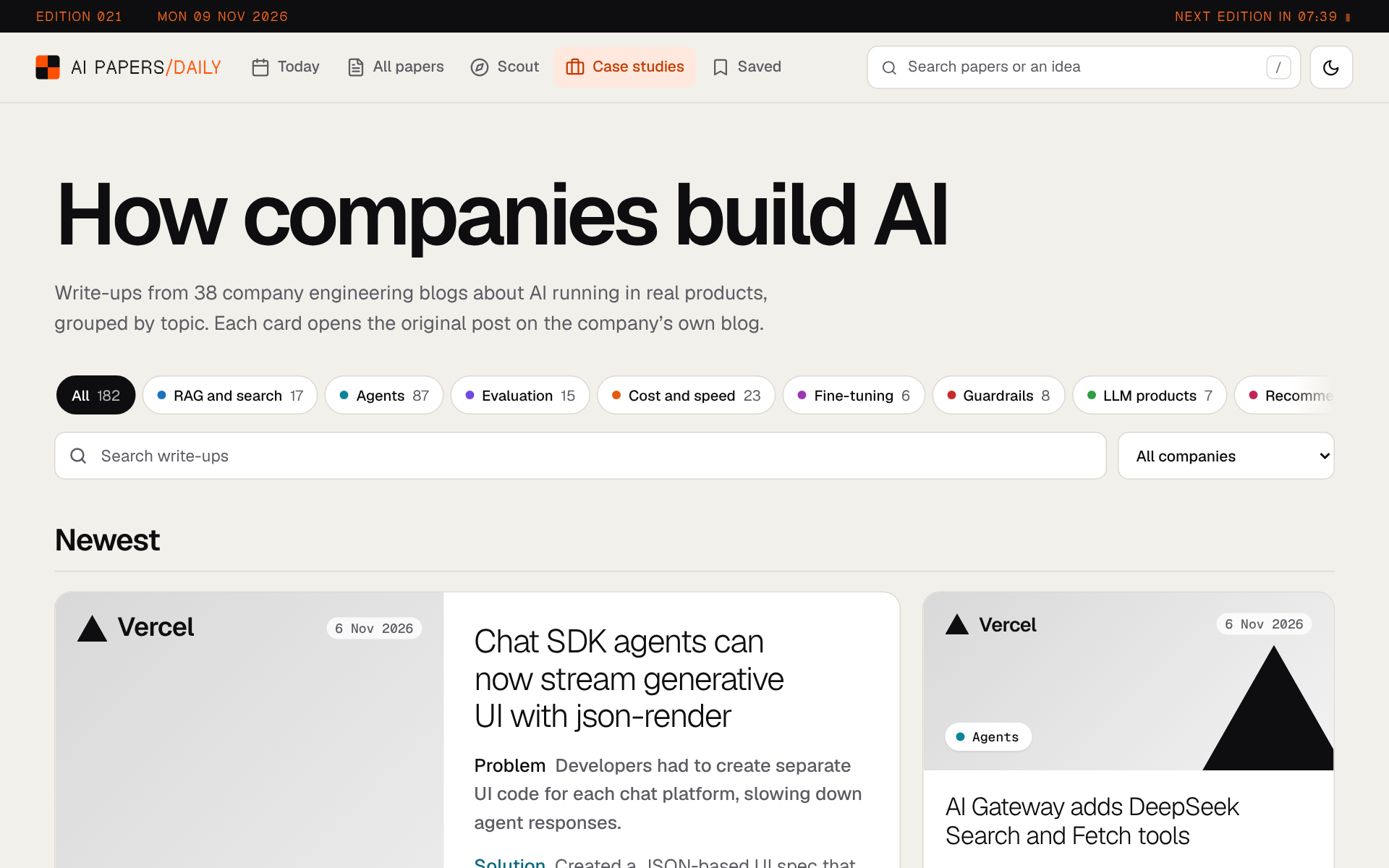
Papers show what's possible. Company engineering blogs show what actually shipped. So every Monday and Thursday the job reads 65 company blogs, from Netflix and Spotify to Booking.com and Zalando.
For each new post, the AI reads the full article and decides what kind of post it is: a write-up of how a company built something with AI, a product launch, a research result, an event recap, or something else. Only the build write-ups are kept. Each one gets a topic, up to 3 technique tags, the problem the team had in at most 20 words, how they solved it in at most 30, and the result when the post reports one, with its number.
A reply without a problem line doesn't count and the post is asked about again on the next run, so every card shows both the problem and the solution. To stay within the free tier, each run makes at most 60 AI calls and at most 6 per blog, so every blog gets a turn. Each card links to the company's own post. You are reading the one case study that isn't from someone else's blog.
14Email, RSS and the weekly edition
- The daily email. The email service's automatic option costs money, but sending through its API is free, so the morning job sends the email itself. It is built from simple tables, because that's what Gmail and Outlook show reliably, and it can never be sent twice in one day.
- The weekly edition. On Sundays a longer email replaces the daily one. It collects the week's papers, keeps each paper's highest upvote count, ranks the week, and takes Figure 1 of the lead stories from arXiv. An AI writes a plain headline and short copy for each story, and a second call checks that copy against the abstract. Copy that fails twice is replaced by the paper's own title and notes.
- RSS, sitemap and share images. Every paper page gets its own preview image for when it's shared, and the feed carries the picks for anyone who reads in a feed reader.
- Numbers without cookies. The site counts visits, clicks on the pick against trending, answers to "have you seen this paper before?" and returning readers, all as daily totals with nothing about you.
15The website
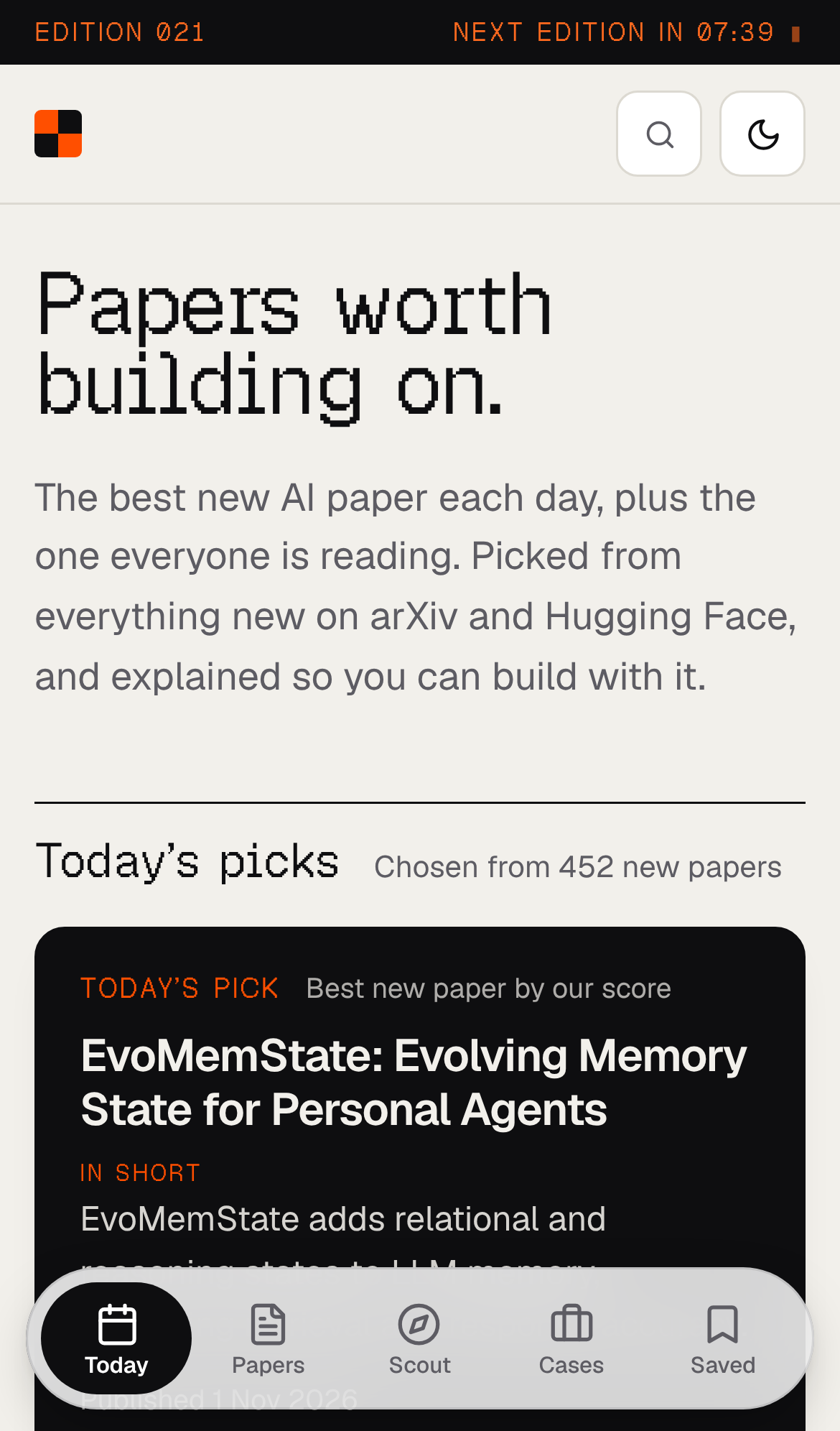
The whole site is made by one Python script of about 2,000 lines, with about 2,300 lines of plain JavaScript and no framework. Every morning it writes over 1,100 paper pages, a page for each day, the lab pages, the trends, the case studies, the feed and the sitemap. Every page works in light and dark mode, and on phones the menu moves to the bottom of the screen.
The design idea was "a research terminal, not a blog". Orange marks what matters most, like today's pick. Yellow marks what you chose, like your highlights. Small mono labels carry the facts; large type carries the ideas. Your saved papers, notes and highlights stay in your own browser, so there's no account to make and nothing to leak.
Part 05Sections 16–19
Behind the scenes
How the pieces connect, how I check them, and what went wrong.
16How it all fits together
Now that you've seen each part, here is the whole picture. It is three simple things: a scheduled job, a folder of files, and a website, plus a database for the parts that have to answer you live.
- The files are the archive. Each morning saves one file with every paper it looked at. The website, the emails and the feed are all built from those files, so any past day can be rebuilt or re-tested.
- The website is static. It is plain pages, made once each morning, so there is nothing that can crash at night and nothing to pay for while nobody is reading.
- Live features are small functions. Search, For you, Ask, Scout, the full-paper breakdown and the view counts call seven small functions in Supabase straight from your browser.
/GitHub
data/daily/*.json, links, lab logos, case studies/Supabase
/Outside services
17Checking it works
Changing a prompt used to be a guess. Now there are fixed tests, so every change can be measured before and after, and a change that makes things worse is caught before readers see it.
| What | How it's checked |
|---|---|
| The pick | The backtest: compare each past pick with upvotes a few days later |
| Project Scout | 26 example projects with papers we know are right. Is a right paper in the top 10, how high is it, and how often did Scout need a second search? |
| Ask this paper | 30 questions on 6 papers, 5 of them impossible to answer. Does it quote the paper, is it right, and does it admit when it can't answer? |
| Readers | Pick vs trending clicks, “seen it before?” answers and returning readers, in one report |
| The code | Every Monday an AI reviews the week's changes, runs the tests, and opens up to 3 issues for likely bugs |
The weekly code review is an agent too. It runs the tests and a linter, reads each changed file's diff, and names likely bugs, each with a line number and the code on that line. A finding whose code isn't really on that line is thrown away, which removes most made-up bugs, and anything filed before is skipped.
18Limits and safety
- Hourly limits. Each visitor can only use each live feature a set number of times per hour, so the bill can't run away.
- Write access. Only the morning job, with its own secret, can add papers to the database.
- Graceful failure. If the AI service is down, Scout still shows its search results, marked as not checked. AI summaries on paper pages have a daily cap; past it, the page shows the breakdown without one.
- Tidy storage. Full papers that nobody has asked about for 30 days are deleted.
- Honest labels. Every page says the notes are written by AI and should be checked against the paper.
19What broke
Most of the work after launch went into one thing: the edition arriving on time, every day. These are the failures that taught me the most.
- GitHub's timer runs late. Scheduled jobs often started hours after 07:00. Now a free outside timer (cron-job.org) starts the job at exactly 07:00, and GitHub's own timer stays as a backup at 08:00 that does nothing if the edition is already out.
- The AI failed quietly. For days, every summary was a fallback and nothing said so. Now there are backup AI models, and the notes check catches a bad answer instead of publishing it.
- Other services go down. The links, the case studies, the database update and the email are all allowed to fail. The site still builds from what's already saved.
- Old pages lost their data. A stats file was being rebuilt wrongly, so topic pages lost every day but the newest. Rebuilding from the daily files fixed it for good.
on:
  schedule:
    - cron: "30 2 * * *"   # backup, 08:00 IST
  workflow_dispatch:        # the real start: cron-job.org at 01:30 UTC

steps:
  - name: Skip the backup run if today's edition is out
    run: [ -f "data/daily/$today.json" ] && echo "skip=true"
  - name: Sync to Supabase
continue-on-error: true # the site still builds if Supabase is downPart 06Sections 20–22
Looking back
What I would tell myself before starting, and what comes next.
20Lessons
- Let every step fail. The morning edition matters more than any one feature in it.
- Keep the data as files. Every day can be rebuilt, compared and re-tested.
- Count evidence, not buzzwords. For ranking papers, and for naming labs.
- Ask the AI easy questions. "Which of these two?" beats "score out of 100".
- Check the AI with plain code. Word limits, numbers and line checks catch more than a better prompt.
- Measure before you change. A small test beats a strong opinion.
21What's next
Ideas on the list: feeds for each topic, a short audio version of the morning edition, using readers' "worth it" votes in the ranking, and picking a day later once there are enough settled days to be sure it is better.
22The tools
| Part | Built with |
|---|---|
| The morning job | Python, LangGraph, GitHub Actions, arXiv, Hugging Face, Semantic Scholar, OpenAlex |
| AI | Groq running gpt-oss-120b, with gpt-oss-20b as backup · gte-small for search · LangChain and LangSmith |
| Database and live features | Supabase: Postgres, pgvector, Edge Functions in TypeScript |
| Website | Plain HTML, CSS and JavaScript, charts drawn as SVG, hosted on GitHub Pages |
| Delivery | cron-job.org, Buttondown for email, Umami for visit counts |
/Additional resources